
Google's New AI Report in Search Console: Here's How to Optimize for It
TL;DR: Google has launched a dedicated Generative AI performance report in Search Console. For the first time, you get official data on how your pages appear inside AI Overviews and AI Mode. For two years, marketers have been optimizing for AI answers without any way to measure it. That just changed. In this post we cover what the new report shows, what it still hides, and what Google’s own AI optimization guide says actually works, so you can put the new data to use right away.

Finally: Real Numbers from Google
Every marketer working with AI search has faced the same question from stakeholders: “Are we actually showing up in AI answers?” Until now, the honest answer was: we can test and we can estimate, but Google won’t tell us.
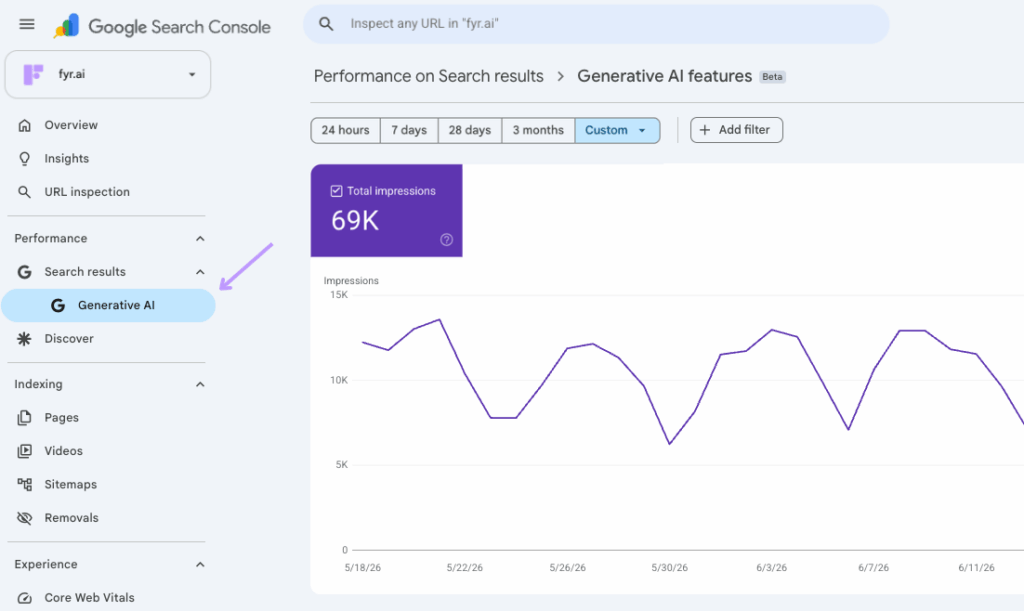
On June 3, 2026, that changed. Google rolled out a Generative AI performance report inside Search Console. It gives website owners their first official view of how their content performs inside Google’s AI-powered search features: AI Overviews, AI Mode, and the AI features in Discover (Google Search Central, 2026).
You’ll find it under Performance → Search results → Generative AI.
What the New Report Shows:
The report gives you five views of your AI visibility:
- Impressions: how often URLs from your site appeared in generative AI features in Search and Discover.
- Pages: exactly which URLs are being surfaced inside AI answers.
- Countries: where in the world your AI visibility is strongest.
- Devices: what devices people are using when they see your pages.
- Dates: performance over time, with hourly, daily, weekly, and monthly granularity.
That last one is more useful than it sounds. Hourly data means you can see whether a newly published page gets picked up by AI features the same day. It’s a direct feedback loop on your content work that simply didn’t exist before
What It Doesn't Show (Yet):
- No clicks or CTR. The report shows how often you appeared, not whether anyone clicked. Google has said more metrics will be added over time, but for now you need your analytics tool to see what the visibility is actually worth (Search Engine Land, 2026).
- No queries. You can see which pages show up in AI answers, but not which questions triggered them. That’s a big missing piece for content strategy.
- No competitor data. The report tells you nothing about how you stack up against the brands you compete with in AI answers.
- Limited rollout. The report is launching with a subset of website owners, starting in the UK following requirements from the British competition authority, with global expansion to follow. Don’t panic if you can’t see it yet.
One more thing worth knowing: Google also introduced a toggle that lets you block your content from AI Overviews and AI Mode entirely, without affecting your regular search rankings. For almost every brand, switching it off would be trading real visibility for nothing. The goal isn’t to hide from AI answers. The goal is to be the source they cite.
How to Optimize for It: Google's Own Advice
Alongside the report, Google published an official guide on optimizing for its generative AI features, and it cuts through a lot of noise. Two takeaways stand out.
First: SEO is still the foundation. Google’s AI features are built on its core search ranking systems. When AI Mode answers a question, it retrieves relevant pages from the regular search index (a technique called retrieval-augmented generation) and often runs several related searches behind the scenes, something Google calls query fan-out, to gather more sources. In Google’s own view, optimizing for generative AI search is SEO. Your years of SEO work aren’t obsolete. They are your ticket in.
Second: skip the “AI hacks.” Google explicitly lists things you can ignore for Google Search:
- llms.txt files and special AI markup. Google Search doesn’t use them.
- “Chunking” your content into tiny pieces. Google’s systems understand multiple topics on one page.
- Rewriting content just for AI. The systems understand synonyms and meaning, so you don’t need to capture every possible phrasing.
- Chasing inauthentic mentions. Spam systems catch manufactured buzz, in AI features too.
What Google does reward is what it calls non-commodity content: unique perspectives, first-hand experience, and real expertise. Not the generic “7 tips” articles anyone (or any AI) could have written. If your content simply restates what’s already out there, there is no reason for an AI answer to cite you specifically.
We’ve written a full guide on exactly that, covering all the major AI platforms, including how to measure your AI Share of Voice and the content strategies that get you cited:
How to Make Your Brand Visible in AI Models.
How to Put the New Data to Work
Our recommendation is simple:
- Check if the report is live for your site, and screenshot day one as your baseline.
- Find the gap pages: pages that rank well in classic search but don’t appear in AI features. That’s your optimization backlog.
- Combine it with your other AI data, like AI referral traffic in your analytics and third-party visibility tracking. The Search Console report is one piece of the puzzle, not the whole picture.
- Create a dashboard in Fyr that tracks all your AI visibility data in one place: Search Console impressions, AI referral traffic, and visibility tracking, updated automatically. No more jumping between tools to answer “how are we doing in AI search?”